Lebatared: Injecting Playful Authenticity into Your Designs
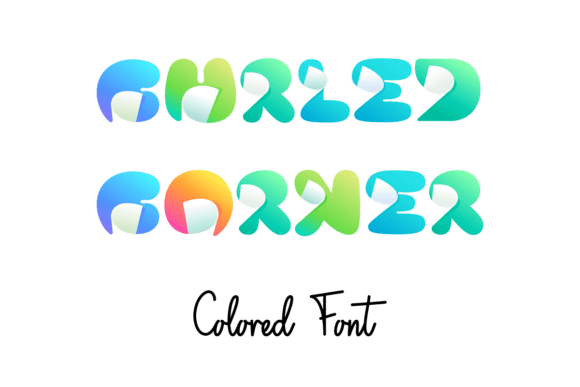
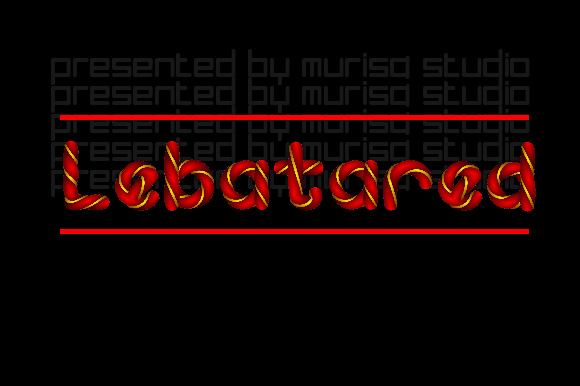
If you've ever worked on a project for a younger audience, you know the specific challenge: finding a typeface that feels energetic without looking cheap or chaotic. Enter Lebatared. This is not your standard geometric sans serif or stiff serif font. It is a color font—specifically built using OpenType-SVG technology—that brings immediate vibrancy to the canvas. It captures the essence of childhood creativity, embodying a sense of playfulness and authenticity that standard monochrome typefaces struggle to achieve on their own.
As a creative professional, I view Lebatared as a specialized tool in the modern typography arsenal. It isn't just about the letters; it's about the texture and the hue baked right into the file. For designers, entrepreneurs, and content creators, this font solves a specific problem: how to create high-impact visuals for children's activities, educational materials, or school projects with minimal effort. Because the color is embedded in the font file, you save time on layering textures or applying complex gradients in post-production.
The Technical Reality: Understanding OpenType-SVG
Before you dive into using Lebatared, it is crucial to understand the mechanics of how it works. This is a premium font that utilizes OpenType-SVG. In plain terms, this means the font files contain vector graphics with color information, rather than just the standard vector outlines you find in a typical display font or script font.
This technology offers a massive advantage for visual fidelity, but it comes with specific software requirements. Lebatared is fully compatible with major industry standards like Adobe Photoshop, Adobe Illustrator, Silhouette, and Inkscape. These platforms can read the embedded SVG data to render the colorful, textured look instantly.
However, you must pay attention to your toolset limitations. The OTF and TTF files included with Lebatared are not compatible with Cricut machines. This is a common sticking point for hobbyists and crafters. If you are designing for a Cricut user, or if you intend to use this for physical die-cutting, you will need to convert the text to outlines (shapes) within Illustrator or Silhouette Studio before sending the file to the cutting machine. Treating the text as an image rather than a font is the workaround, but for digital web design or print, the native font file works seamlessly.
Visual Personality and Brand Perception
Why choose Lebatared over a standard handwritten font? The answer lies in visual hierarchy and brand perception. A standard sans serif font implies corporate efficiency. A standard serif font implies tradition and authority. Lebatared, however, implies joy and approachability.
When you use this typeface in logo design or brand identity for a daycare, a toy brand, or a family-focused blog, you are signaling that your brand is fun and accessible. The visual characteristics of the font—likely featuring irregular baselines, playful strokes, and integrated color—help break the rigid grid of traditional editorial design. This can significantly increase audience engagement, particularly with parents and children who respond to visual stimuli that feels organic rather than corporate.
Practical Applications for Creators
The versatility of Lebatared extends across various media. Here is where I recommend utilizing this creative font:
- Packaging Design: Use it for product headers on snack packaging or toy boxes. It stands out on the shelf because it doesn't look like standard corporate marketing.
- Social Media Graphics: Instagram stories and TikTok overlays often suffer from visual fatigue. A colorful, bold font grabs attention faster than a standard modern typography choice.
- Web Design: While not ideal for body text (due to file size and readability at small scales), it is perfect for hero banners and call-to-action buttons on sites targeting family demographics.
- Publishing: Think chapter titles in children’s books or headers in educational workbooks. It adds a layer of visual interest that supports the reading experience.
Strategic Font Pairing and Integration
One of the most common mistakes I see with display fonts like Lebatared is overuse. Because it is visually loud and rich in detail, it should almost never be used for body copy. Readability drops significantly when you use a textured, colorful font for long paragraphs.
Instead, treat Lebatared as your headline artist. You need a supporting cast to handle the heavy lifting. For the best font pairing, look for stability.
- Pair with a Geometric Sans Serif: A clean, rounded sans serif font (like Poppins or Nunito) creates a perfect contrast. The simplicity of the body text allows the personality of Lebatared to shine without overwhelming the viewer.
- Pair with a Monospace Font: If you are designing for an educational context, pairing Lebatared with a monospace font can create a fun "coding for kids" aesthetic.
Evaluating Fit and Licensing
Before incorporating Lebatared into your next project, perform a quick "squint test." Squint your eyes at your mockup. Does the hierarchy hold up? The color in the font adds visual weight, so ensure it doesn't overpower your key messaging.
Furthermore, as this is a commercial font, you must ensure your licensing covers your usage. Whether you are a small business owner creating flyers or a large agency producing national campaigns, check that your license permits the specific distribution method. Since this is a design asset that can elevate a brand identity, it is a worthwhile investment, but one that needs to be legally sound.
Ultimately, Lebatared is more than just a file you install; it is a mood setter. It bridges the gap between professional graphic design and the authentic, messy fun of childhood. For the right project, it is an invaluable asset that makes your work look polished, playful, and purposeful.